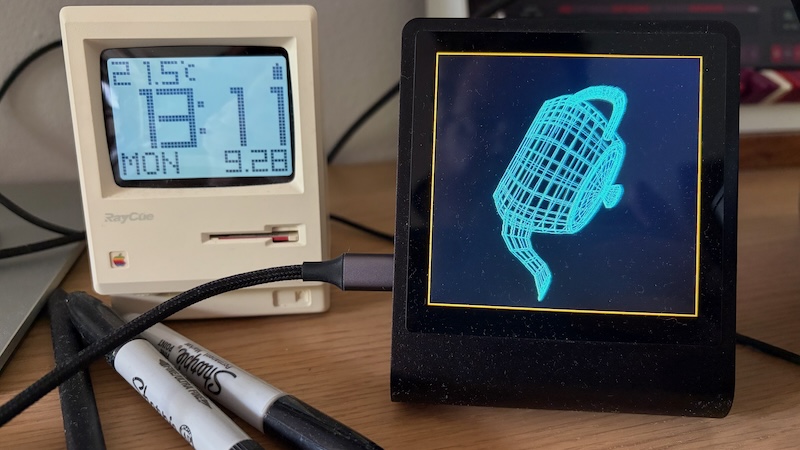
The Pimoroni Presto is a beautiful device. Aluminium frame, 4 inch IPS display, RP2350 powered, it even comes with 8mb of PSRAM. The downside is the display is driven by an ST7701S controller, not the traditional ST7789. Unlike the ST7789, the ST7701 does not contain its own frame buffer, instead it relies on the microcontroller to drive it like a tiny HDMI display. This implies the microcontroller has to dedicate ram to a frame buffer, and constantly scan that frame buffer to the display.
The Pimoroni sample code uses Micro Python and runs the frame buffer at 240×240, then pixel doubles the frame buffer during scan out to the display. At 16 bits per pixel, this costs 115,200 bytes. We can do better with TinyGo.
A 480×480 buffer at 16bit per pixel would cost 460,800 bytes, which is achievable with the RP2350 — just. The Presto documentation suggests that the PSRAM can be used for a frame buffer, but tests show that it’s not nearly fast enough for 42Hz, the minimum refresh rate for the display. Perhaps they meant — put your data in PSRAM and leave the internal SRAM for the frame buffer.
However, because we’re already dedicating a core to driving the display, there is enough time to do some processing per line. If we store the image in the frame buffer as 8bits, and use a lookup table to expand to 16bits on the fly, we halve the size of the frame buffer, and make it twice as fast to work with — memory bandwidth is also a resource we need to conserve.
The result is a display system that uses a 480×480 8bit frame buffer which is expanded to 16 bits per pixel on the fly, then pushed out to the display via DMA. This leaves lots of SRAM, as well as a second core which can display interesting things. For this demonstration I chose a wireframe rendering of the classic Utah Teapot.